
For many customers, the biggest concern is not only how private tapes are transferred. It is what happens after the tapes become digital files.
That concern is understandable. Private videotapes, adult VHS tapes, discreet camcorder recordings, and sensitive printed photos are personal. Customers want to know how the files are delivered, how long cloud access lasts, whether the original tapes are returned, and what they should do after receiving the completed order.
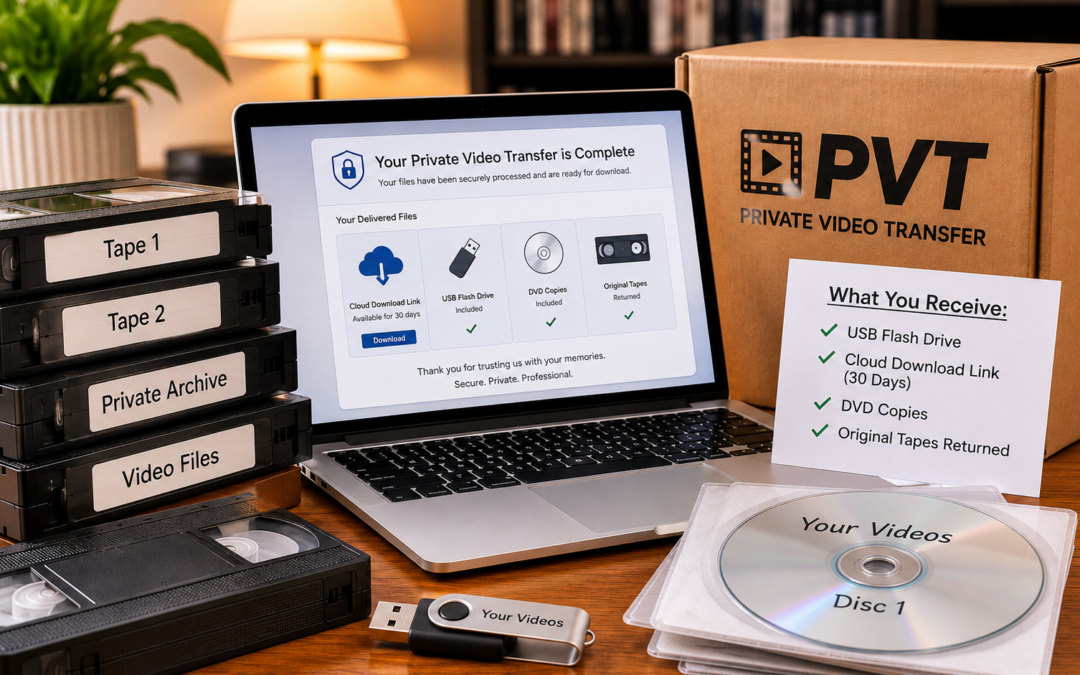
Private Video Transfer provides modern digital delivery while keeping the process straightforward. Completed tape transfers include files on a USB flash drive, temporary cloud delivery, DVD copies, and return of the original media. Standard UPS Ground shipping back to the customer is included, too.
What does Private Video Transfer deliver?
Completed tape-transfer orders include several delivery formats.
Customers receive:
- Digital video files on a USB flash drive
- A temporary 30-day cloud-download link
- One DVD copy for each transferred videotape
- The return of the original tapes
This gives customers more than one way to access the completed transfer. The service is $35 per accepted adult tape, $25 per accepted non-adult tape, or $1 per loose printed photo, with a $99 minimum order. USB, cloud delivery, one DVD per transferred tape, and standard UPS Ground return shipping are included. Customers pay for inbound shipping; see current pricing.
The USB drive is the primary modern delivery format. The cloud link is convenient for downloading files during the access period. DVD copies are included for customers who still want a disc-based version. The original media is returned so customers are not giving up possession of their tapes.
Why are files delivered on USB?
USB flash drives are convenient for modern digital delivery.
They can be used with many computers, some televisions, and other compatible devices. They also make it easier to copy the completed files to another computer, external hard drive, or backup location.
For most customers, the USB drive becomes the main copy of the completed transfer. For homemade private recordings, our Sex Tapes to Digital page explains accepted material and the ordering process.
A USB drive is also easier to store than a box of videotapes. It takes up less space, is easier to duplicate, and does not require a VCR or camcorder for playback.
What kind of files are created?
Private Video Transfer converts eligible videotapes into digital video files that can be stored, played on modern devices, and backed up where the customer has the right to do so. See our Adult VHS to Digital service for older adult VHS collections.
The exact file details may depend on the source tape and the transfer workflow, but the goal is simple: create a usable digital version of the original recording. For VHS-C, Video8, Hi8, Digital8, and miniDV, see our Private Camcorder Tape Transfer service.
The digital file reflects what can be captured from the tape. If the original recording is old, damaged, poorly recorded, or unstable, the file may show those same issues.
Digitizing a tape preserves the playable contents. It does not automatically transform old analog footage into new high-definition video.
Is cloud delivery included?
Yes. A temporary cloud-download link is included with completed tape-transfer orders.
The cloud link is provided so customers can download their files without relying only on the USB drive.
This is especially useful for customers who want to save a copy to a computer, external drive, or private storage account soon after the order is completed.
The cloud link is temporary and should not be treated as permanent storage.
How long does cloud access last?
Cloud delivery is available for 30 days. This is an access period, not a promise of permanent hosting or a specific date when every internal production copy is deleted.
Customers should download their files during that period and save them somewhere they control.
Do not wait until the end of the access window to download important files. It is better to download them soon after receiving the delivery email.
Once the cloud-access period ends, customers should not assume the files will remain available online.
Should customers download their files right away?
Yes.
Customers should download their transferred files as soon as possible during the 30-day cloud-access period.
After downloading, save the files in more than one place.
Good backup locations may include:
- A computer
- An external hard drive
- A second USB drive
- A private cloud-storage account
- A secure backup drive kept in another location
One copy is not enough for important personal recordings.
If a file matters, it should exist in at least two places. For irreplaceable material, three copies is even better.
Are DVD copies included?
Yes. One DVD copy is included for each transferred videotape at no additional charge. For more on eligible adult videotapes and disc delivery, see Porn Tapes to DVD.
Some customers still prefer DVDs because they are familiar, easy to label, and simple to store with other physical media.
DVDs can also be convenient for customers who want a disc version in addition to digital files.
However, DVD should not be treated as the only long-term copy. Discs can become scratched, lost, or harder to play as DVD players become less common.
The digital files on USB and customer-created backups are usually more practical for long-term access.
Are the original tapes returned?
Yes. Original videotapes are returned after processing.
The original tapes are part of the completed return shipment along with the USB drive and DVD copies.
Returning the originals is important because some customers want to keep the tapes for sentimental, legal, personal, or backup reasons.
Even after digitization, customers may choose to keep the original tapes stored in a safe, dry, climate-stable location.
Should customers keep the original videotapes?
In most cases, yes.
Even if the digital transfer is successful, the original tapes may still have personal value.
Customers may want to keep them as:
- A physical backup
- A personal archive
- Proof of the original media
- A sentimental item
- A fallback if files are accidentally lost
That said, old videotapes should not be considered permanent storage. They can deteriorate over time and may become harder to play as equipment becomes less available.
The safest approach is to keep the digital files backed up and store the original tapes carefully.
How should digital files be stored?
Private files should be stored somewhere secure and easy to access.
After receiving the completed transfer, customers should decide where the files belong.
Possible storage options include:
- A password-protected computer
- An external hard drive stored privately
- A second backup drive
- A private cloud account controlled by the customer
- An encrypted storage device, if extra privacy is desired
The right choice depends on the customer’s comfort level, technical ability, and privacy needs.
For private or adult material, customers should think carefully before saving files to shared family computers, shared cloud accounts, work devices, or automatic photo/video libraries.
Should private videos be saved to a phone?
That depends on the customer’s privacy preferences.
Phones are convenient, but they may also sync files automatically to cloud accounts, shared albums, messaging apps, or backup services.
Before copying sensitive files to a phone, customers should understand how their device handles video storage and backups.
For many people, a private computer, external drive, or dedicated USB backup may be a better choice for sensitive material.
Should private files be uploaded to personal cloud storage?
Some customers choose to back up their files to their own private cloud-storage account.
That can be convenient, but it should be done intentionally.
Before uploading sensitive material, consider:
- Who has access to the account
- Whether the account is shared with family members
- Whether automatic photo or video organization is enabled
- Whether previews or thumbnails may appear on other devices
- Whether two-factor authentication is turned on
- Whether the service allows the type of content being stored
Private media should be stored in a location the customer understands and controls.
What happens to files during the transfer process?
During transfer, the tape must be captured and converted into a digital file.
That means working files are created as part of the production process.
A realistic privacy policy should not claim that files never exist during processing. They must exist long enough to complete the order, prepare the USB drive, create delivery materials, and provide the temporary cloud link.
The appropriate goal is professional handling, limited practical access, and management of delivery files according to the service workflow. The 30-day cloud-access period does not, by itself, establish the retention period for every production or backup copy. Customers with specific deletion concerns should contact us before shipping.
You can read more about customer privacy on the Privacy & Discretion page.
Will anyone review the files?
Private Video Transfer is a transfer service, not an entertainment service or review service.
The purpose is to convert accepted media and deliver usable files.
However, some level of handling and basic technical review may be necessary during production.
For example, a technician may need to confirm that a tape is playing, that audio is present, that the capture completed, or that a file was created correctly.
No physical transfer company should promise that no human will ever encounter any portion of the media. A more honest promise is that access should be limited to what is necessary to complete the work.
Are files edited or renamed?
Standard service is transfer, not custom editing.
The goal is to preserve the playable contents of the original tape in a modern digital format.
Customers should not assume that individual scenes will be removed, rearranged, enhanced, titled, or edited unless those services have been discussed separately.
File names are generally functional rather than descriptive. Customers may rename their own files after receiving them if they want a more personal organization system.
What if a tape is blank or partially blank?
Older videotapes often contain blank sections, recording gaps, or footage recorded over previous material.
A tape may contain:
- Long blank sections
- Short clips separated by gaps
- Multiple unrelated recordings
- Tracking interruptions
- Audio-only or video-only problems
- Footage recorded at different times
The final digital file may reflect what is actually on the tape.
If a tape has no playable content, the order may require customer communication before completion.
Can file quality be better than the original tape?
The final digital file can only capture what exists on the source tape.
Transfer equipment may produce a more stable capture than an ordinary home setup, but it cannot recreate detail that was never recorded or has been permanently lost.
Common limitations include:
- Low original resolution
- Camera shake
- Poor lighting
- Weak audio
- Tracking noise
- Tape wear
- Color fading
- Signal dropouts
Digitizing the tape is about preservation and accessibility. It does not turn an old analog recording into a newly shot modern video.
What happens if the files will not play on my device?
Different computers, televisions, and media players handle video files differently.
If a file does not play on one device, it may still play correctly on another.
Customers should first try opening the file on a computer. If the file plays there, the issue may be with the television, USB port, media player, or device compatibility.
Keeping a second copy on a computer or external drive is also useful in case a USB device becomes damaged or misplaced.
Can customers make their own copies?
Customers can make personal backup copies of files they have the legal right to reproduce. For privately recorded media they own or control, making backups is a sensible preservation step.
Making backups is strongly recommended for important or irreplaceable recordings.
A good backup plan could include:
- Keep the original USB drive.
- Copy the files to a personal computer.
- Copy the files to an external backup drive.
- Download files from the cloud link during the 30-day access period.
- Store one backup somewhere separate from the original USB.
The customer is responsible for long-term storage after delivery.
How are printed photos delivered?
Private Video Transfer also accepts loose printed photographs, including legal adult or sensitive personal images.
Scanned photos are delivered digitally and returned with the completed order.
Photos must be loose and removed from albums, frames, scrapbooks, sleeves, or other holders before shipping.
The service does not currently accept slides, negatives, albums, scrapbooks, or oversized photo projects.
For details, review the Accepted Formats page.
How does billing and return shipping appear?
Private Video Transfer orders are billed through Memory Fortress, an established digitization operation.
That means invoices or payment receipts may display the Memory Fortress name.
Return shipping may be processed through an affiliated Nostalgic Media fulfillment account, which may appear in tracking or return-shipping communication.
These relationships are disclosed in the customer confirmation so invoices, receipts, and tracking notices do not arrive without explanation.
What should customers do after receiving the order?
After the completed order arrives, customers should check the package and confirm that all expected items are present.
A good post-delivery checklist includes:
- Confirm that the original tapes were returned.
- Confirm that the USB drive is included.
- Confirm that DVD copies are included, if applicable.
- Open the USB drive on a computer.
- Download files from the cloud link during the 30-day access period.
- Make at least one backup copy.
- Store the original tapes in a safe location.
This final step is important. The transfer is only part of preservation. Customers should also protect the files after they receive them.
Where should original tapes be stored after transfer?
Original tapes should be stored in a cool, dry, stable location.
Avoid storing tapes in:
- Hot attics
- Damp basements
- Garages
- Storage units with extreme temperature changes
- Areas with humidity, dust, or pests
- Direct sunlight
Even after digitization, poor storage can damage the original tapes further.
For private material, customers should also choose a location that is physically secure and personally appropriate.
When should customers ask questions?
Customers should ask questions before shipping if they are unsure about format, pricing, legal-content rules, or delivery.
After delivery, customers should ask promptly if something appears missing, confusing, or unclear.
Questions can be submitted through the Ask a Private Question form.
The bottom line
After a private video transfer, customers receive digital files on USB, temporary cloud delivery, DVD copies for transferred tapes, and return of the original media.
The 30-day cloud link should be used for download convenience, not permanent storage.
Customers should download their files promptly, create backups, and store both the digital files and original tapes carefully.
Private Video Transfer is designed to provide a practical, discreet path from aging tapes to modern digital files while giving customers control over their completed media.
Find the right service for your tapes
Whatever type of eligible private media you have, these service pages explain accepted formats, delivery options, and the next step.
Related Private Transfer Guides
Ready to receive your private tapes as digital files?
Private Video Transfer provides USB delivery, 30-day cloud access, one DVD per transferred videotape, and standard UPS Ground return shipping for eligible orders—all included in the service price.
Start an Order View Pricing